Vue
Vuex
mapState
当一个组件需要获取多个状态的时候,将这些状态都声明为计算属性会有些重复和冗余。为了解决这个问题,我们可以使用 mapState 辅助函数帮助我们生成计算属性,让你少按几次键:
// 对象形式
computed:{
  ...mapState({
    count: state => state.count,

    // 传字符串参数 'count' 等同于 `state => state.count`
    countAlias: 'count'
  })
}


// 数组形式:当映射的计算属性名称和 state 里面一样时
computed:{
  // 映射 this.count 为 store.state.count
  ...mapState(['count'])
}
mapGetters
与 mappState 类似,mapGetters 也可以让你映射组件的 getter 属性:
// 对象形式
computed:{
  ...mapGetters({
    // 把 `this.doneCount` 映射为 `this.$store.getters.doneTodosCount`
    doneCount: 'doneTodosCount'
  })
}


// 数组形式
computed: {
  ...mapGetters([
   'doneTodosCount',
   'anotherGetter',
  ])
}
使用常量代替 Mutation 事件类型
使用常量替代 mutation 事件类型在各种 Flux 实现中是很常见的模式。这样可以使 linter 之类的工具发挥作用,同时把这些常量放在单独的文件中可以让你的代码合作者对整个 app 包含的 mutation 一目了然:
// mutation-types.js
export const SOME_MUTATION = "SOME_MUTATION";
// store.js
import { createStore } from 'vuex'
import { SOME_MUTATION } from './mutation-types'

const store = createStore({
  state: { ... },
  mutations: {
    // 我们可以使用 ES2015 风格的计算属性命名功能来使用一个常量作为函数名
    [SOME_MUTATION] (state) {
      // 修改 state
    }
  }
})
mapMutations
一条重要的原则就是要记住 mutation 必须是同步函数。
可以在组件中使用 this.$store.commit('xxx') 提交 mutation,或者使用 mapMutations 辅助函数将组件中的 methods 映射为 store.commit 调用
 methods: {
    ...mapMutations([
      'increment', // 将 `this.increment()` 映射为 `this.$store.commit('increment')`
    ]),


    ...mapMutations({
      add: 'increment' // 将 `this.add()` 映射为 `this.$store.commit('increment')`
    })
  }
mapActions
Action 类似于 mutation,不同在于:
- Action 提交的是 mutation,而不是直接变更状态。
- Action 可以包含任意异步操作。
在组件中使用 this.$store.dispatch('xxx') 分发 action,或者使用 mapActions 辅助函数将组件的 methods 映射为 store.dispatch 调用
import { mapActions } from "vuex";

export default {
  // ...
  methods: {
    ...mapActions([
      "increment" // 将 `this.increment()` 映射为 `this.$store.dispatch('increment')`
    ]),
    ...mapActions({
      add: "increment" // 将 `this.add()` 映射为 `this.$store.dispatch('increment')`
    })
  }
};
Module
Vuex 允许我们将 store 分割成模块(module)。每个模块拥有自己的 state、mutation、action、getter、甚至是嵌套子模块——从上至下进行同样方式的分割
使用辅助函数映射模块中的内容:
computed: {
  ...mapState({
    a: state => state.someModule.a,
    b: state => state.someModule.b
  })
},
methods: {
  ...mapActions([
    'someModule/foo', // -> this['someModule/foo']()
    'someModule/bar' // -> this['someModule/bar']()
  ])
}
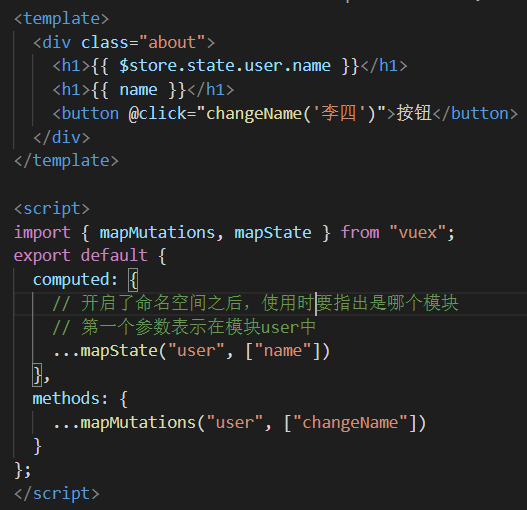
开启模块及命名空间之后,Vuex 辅助函数的第一个参数为模块名称
computed: {
  ...mapState('someModule', {
    a: state => state.a,
    b: state => state.b
  })
},
methods: {
  ...mapActions('someModule', [
    'foo', // -> this.foo()
    'bar' // -> this.bar()
  ])
}
模块示例
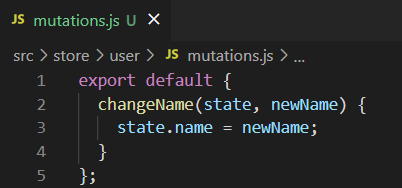
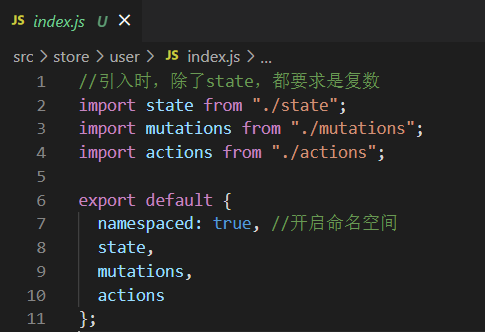
下面是将 user 模块的 state mutations actions 全部拆分开写成了 3 个 js 文件,再引入进 index.js
也可以将 user 模块写成一个 js 文件
- 目录如下
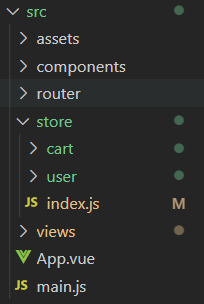
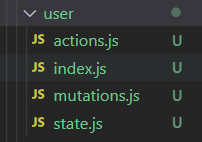
- user 模块下
index 是收集 actions,state,mutations 的内容,并导出
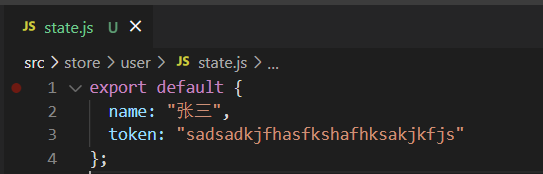
- user 模块的 state 和 mutations
- user 文件夹下的 index 作为中转站,导入 user 文件夹下的其它文件
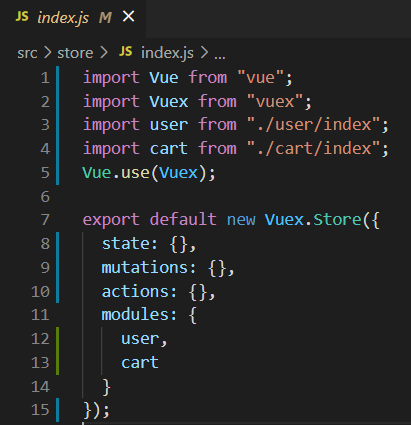
- 在 store 下的 index 注册 user 模块
- 使用 user 模块下的内容