ES6
ES6
ES6, 全称 ECMAScript 6.0 ,是 JavaScript 的下一个版本标准,2015.06 发版。
let & const
let
- 声明的变量只在 let 命令所在的代码块内有效。
- 不能重复声明
- 不存在变量提升
const
声明一个只读的常量,一旦声明,常量的值就不能改变。
解构赋值
数组解构
//基本
const [a, b, c] = [1, 2, 3];
// a = 1
// b = 2
// c = 3

//剩余运算符
const [a, ...b] = [1, 2, 3];
//a = 1
//b = [2, 3]

//字符串
const [a, b, c, d, e] = "hello";
// a = 'h'
// b = 'e'
// c = 'l'
// d = 'l'
// e = 'o'
对象解构
/* 基本 */
const { name, age } = { name: "张三", age: 18 };
// name = '张三'
// age = 18

/* 别名 */
const { name: nickName } = { name: "李四" };
// nickName = '李四'

/* 嵌套的对象 */
const people = {
  name: "张三",
  age: 18,
  address: {
    city: "北京",
    street: "朝阳区"
  }
};

const {
  address: { city, street }
} = people;

/* 剩余运算符 */
const { a, b, ...rest } = { a: 10, b: 20, c: 30, d: 40 };
// a = 10
// b = 20
// rest = {c: 30, d: 40}
Symbol
概述
ES6 引入了一种新的原始数据类型 Symbol ,表示独一无二的值,最大的用法是用来定义对象的唯一属性名。
ES6 在原有的 Number、String、Boolean、Object、null 和 undefined 之外,新增了 Symbol 基本类型。BigInt 是后来在 ES2020 中加入的。
基本用法
Symbol 函数栈不能用 new 命令,因为 Symbol 是原始数据类型,不是对象。可以接受一个字符串作为参数,为新创建的 Symbol 提供描述,用来显示在控制台或者作为字符串的时候使用,便于区分。
let sy = Symbol("KK");
console.log(sy); // Symbol(KK)
typeof sy; // "symbol"

// 相同参数 Symbol() 返回的值不相等
let sy1 = Symbol("kk");
sy === sy1; // false
使用场景
作为属性名
由于每一个 Symbol 的值都是不相等的,所以 Symbol 作为对象的属性名,可以保证属性不重名。
let sy = Symbol("key1");

// 写法1
let syObject = {};
syObject[sy] = "xxxx";
console.log(syObject); // {Symbol(key1): "xxxx"}

// 写法2
let syObject = {
  [sy]: "xxxx"
};
console.log(syObject); // {Symbol(key1): "xxxx"}

// 写法3
let syObject = {};
Object.defineProperty(syObject, sy, { value: "xxxx" });
console.log(syObject); // {Symbol(key1): "xxxx"}
let syObject = {};
syObject[sy] = "xxxx";

syObject[sy]; // "xxxx"
syObject.sy; // undefined
Map & Set
Map
Map 和 Object 的区别
- 一个 Object 的键只能是字符串或者 Symbols,但一个 Map 的键可以是任意值。
- Map 中的键值是有序的(FIFO 原则),而添加到对象中的键则不是。
- Map 的键值对个数可以从 size 属性获取,而 Object 的键值对个数只能手动计算。
- Object 都有自己的原型,原型链上的键名有可能和你自己在对象上的设置的键名产生冲突。
Map 的方法
- set( ) 添加一组数据
- get( ) 传入 ‘键’ 获得 ‘值’
- delete( ) 传入 ‘键’ 删除一组数据,成功删除返回 true
- has( ) 传入 ‘键’ 判断是否存在
- size 获取 Map 的长度
const person = new Map();

person.set("name", "张三");
//Map(1) {'name' => '张三'}

person.set("age", 18);
//Map(2) {'name' => '张三', 'age' => 18}

person.get("name");
//'张三'

person.size;
//2

person.has("name");
//true

person.delete("age");
//true

console.log(person);
//Map(1) {'name' => '张三'}
Map 的 Key
key 为字符串 key 为对象 key 为函数 key 为 NAN
Map 的迭代
一般使用 for...of 和 forEach
let myMap = new Map();
myMap.set(0, "zero");
myMap.set(1, "one");

myMap.forEach((value, key) => console.log(key + " = " + value));
Set
特点
Set 对象允许你存储任何类型的唯一值,无论是原始值或者是对象引用。 Set 内的值都是唯一的,没有重复的值。
Set 的方法
- add( ) 添加一个值,如果重复,则添加无效
- delete ( ) 删除一个值,删除成功返回 true,失败 false
- has( ) 判断里面是否有这个值
- size 获取 Set 的长度
const numberSet = new Set();
numberSet.add(1);
//Set(1) {1}

numberSet.add(2);
//Set(2) {1, 2}

numberSet.add(1);
//Set(2) {1, 2}

numberSet.delete(1);
//true

numberSet.has(1);
//false

numberSet.size;
//1

numberSet.forEach(number => console.log(number));
// 2
Set 的作用
- 数组去重
const mySet = new Set([1, 2, 3, 4, 4]);
[...mySet]; // [1, 2, 3, 4]
- 并集
const a = new Set([1, 2, 3]);
const b = new Set([4, 3, 2]);
const union = new Set([...a, ...b]); // {1, 2, 3, 4}
- 交集
const a = new Set([1, 2, 3]);
const b = new Set([4, 3, 2]);
const intersect = new Set([...a].filter(x => b.has(x))); // {2, 3}
- 差集
const a = new Set([1, 2, 3]);
const b = new Set([4, 3, 2]);
const difference = new Set([...a].filter(x => !b.has(x))); // {1}
字符串
子串的识别
- includes():返回布尔值,判断是否找到参数字符串。
- startsWith():返回布尔值,判断参数字符串是否在原字符串的头部。
- endsWith():返回布尔值,判断参数字符串是否在原字符串的尾部。
字符串重复
repeat():返回新的字符串,表示将字符串重复指定次数返回。
console.log("Hello,".repeat(2)); // "Hello,Hello,"
字符串补全
- padStart:返回新的字符串,表示用参数字符串从头部(左侧)补全原字符串。
- padEnd:返回新的字符串,表示用参数字符串从尾部(右侧)补全原字符串。
以上两个方法接受两个参数,第一个参数是指定生成的字符串的最小长度,第二个参数是用来补全的字符串。如果没有指定第二个参数,默认用空格填充。
console.log("h".padStart(5, "o")); // "ooooh"
console.log("h".padEnd(5, "o")); // "hoooo"
console.log("h".padStart(5)); // "    h"
模板字符串
变量名写在 ${} 中,${} 中可以放入 JavaScript 表达式。
const name = "Mike";
const age = 27;
const info = `My Name is ${name},I am ${age + 1} years old next year.`;
函数
箭头函数
- 函数写法更简洁
- 函数返回值可以隐试返回(不用写 return)
- 解决 this 指向问题
当参数只有一个时,可以不写( ) 当箭头函数可以一行写完时,可以不写{ },并且可以不 retuen 因为隐试返回了
// 报错
var f = (id,name) => {id: id, name: name};
f(6,2);  // SyntaxError: Unexpected token :

// 不报错
var f = (id,name) => ({id: id, name: name});
f(6,2);  // {id: 6, name: 2}
函数参数
默认参数
function fn(name, age = 17) {
  console.log(name + "," + age);
}
fn("Amy", 18); // Amy,18
fn("Amy", ""); // Amy,
fn("Amy"); // Amy,17

//只有在未传递参数,或者参数为 undefined 时,才会使用默认参数,null 值被认为是有效的值传递。
function fn1(name, age = 17) {
  console.log(name + "," + age);
}
fn1("Amy", null); // Amy,null
不定参数
function f(...values) {
  console.log(values.length);
}
f(1, 2); //2
f(1, 2, 3, 4); //4
Promise 对象
概述
是异步编程的一种解决方案。
从语法上说,Promise 是一个对象,从它可以获取异步操作的消息。
Promise 的状态
Promise 异步操作有三种状态:pending(进行中)、fulfilled(已成功)和 rejected(已失败)。除了异步操作的结果,任何其他操作都无法改变这个状态。
Promise 对象只有:从 pending 变为 fulfilled 和从 pending 变为 rejected 的状态改变。只要处于 fulfilled 和 rejected ,状态就不会再变了,即 resolved(已定型)。
Promise 的使用
应用场景是异步请求或是异步函数需要等待执行结果
- promise 一般作为函数的返回值,就是 return 出去一个 promise 对象
- promise 中.then 的参数 res 是 resolve 的内容
- promise 中.catch 的参数 err 是 reject 的内容
- resolve、reject 两个函数不会禁止向下执行,为了防止继续向下执行,要加上 return
- return Promise.reject(error) 就是抛出异常,并且不执行后面的代码
- axios 请求是 promise 函数
<script>
methods:{
  getData1() {
    return axios.get('http://111111111111')
  }
  getData2() {
    return axios.get('http://222222222222')
  }
  getData3() {
    return axios.get('http://333333333333')
  }
}
mounted(){
  //依次调用上面三个方法,then的参数res是上一个peomise返回的结果
  this.getData1().then(res1 => {
    console.log(res1)
    return this.getData2()
  }).then(res2 => {
    console.log(res2)
    return this.getData3()
  }).then(res3 => {
    console.log(res3)
  }).catch(err => {
    console.log(err)
  })
}
</script>
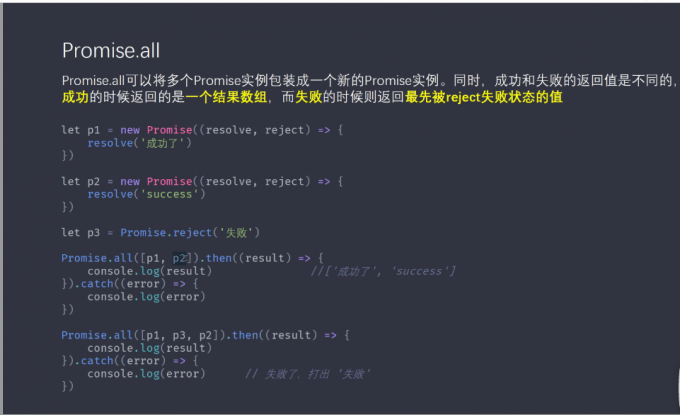
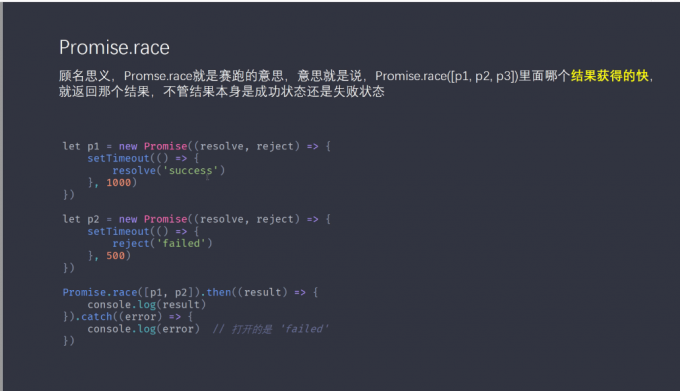
Promise 的方法
async 函数
async/await在 ES2017 中标准化,用于以更直观的方式编写基于 Promise 的异步代码。
返回值
async 函数返回一个 Promise 对象,可以使用 then 方法添加回调函数。
async function helloAsync() {
  return "helloAsync";
}

console.log(helloAsync()); // Promise {<resolved>: "helloAsync"}

helloAsync().then(v => {
  console.log(v); // helloAsync
});
async 函数中可能会有 await 表达式,async 函数执行时,如果遇到 await 就会先暂停执行 ,等到触发的异步操作完成后,恢复 async 函数的执行并返回解析值。
function testAwait() {
  return new Promise(resolve => {
    setTimeout(function () {
      console.log("testAwait");
      resolve();
    }, 1000);
  });
}

async function helloAsync() {
  await testAwait();
  console.log("helloAsync");
}
helloAsync();
// testAwait
// helloAsync
await
await 针对所跟不同表达式的处理方式:
- Promise 对象:await 会暂停执行,等待 Promise 对象 resolve,然后恢复 async 函数的执行并返回解析值。
- 非 Promise 对象:直接返回对应的值。
模块化
export 和 export default
- 都可以用于导出常量、文件、函数、模块等。
- 在一个模块中,export 可以有多个,export default 只能有一个。
- 通过 export 导出,在导入时需要加{ }。
- export 能直接导出变量表达式,export default 不能。
//一次性导入所有export导出的方法
import * as xxxx from “./xxxx”

// 按需引入export导出的方法
import { xx } from “./xxxx”

// 引入export default的方法
import xx from “./xxxx”
node 中的模块化(commonJs)
exports.xxx 单独导出 module.exports 默认导出 require 引入模块
exports.xxx = xxxx;

module.exports = {}
module.exports = getList()=>{};

const xxxx = require('模块')
其它
- require 还可以在 js 中导入图片路径
src = require("./src/img/xxx.png");
- @import 用于在 css 中导入 css 文件或者图片
@import url("~@/css/xxx.css");