Vue 2 基础
Vue
Vue2 响应式
实现原理:
- 对象类型:通过 Object.defineProperty()对属性的读取、修改、拦截
- 数组类型:通过重写数组原型上的一系列方法实现拦截
存在问题:
- 新增属性、删除属性,界面不会更新
- 直接通过下标修改数组,界面不会更新
解决以上问题:
// 给对象新增属性
this.$set(this.person,'sex','女')

// 删除对象的name属性
this.$delete(this.person,'name')

// 修改数组的第一个元素
this.$set(this.arr,0,'xxx')
生命周期
- created 之后:data 和 methods 初始化完成
- mounted 之后:最新的模板挂载到页面中,最早操作 dom
- updated 之后:更新之后的数据显示到页面中
destroyed之后:实例已销毁,事件监听和子组件已清理,不应再依赖它更新界面。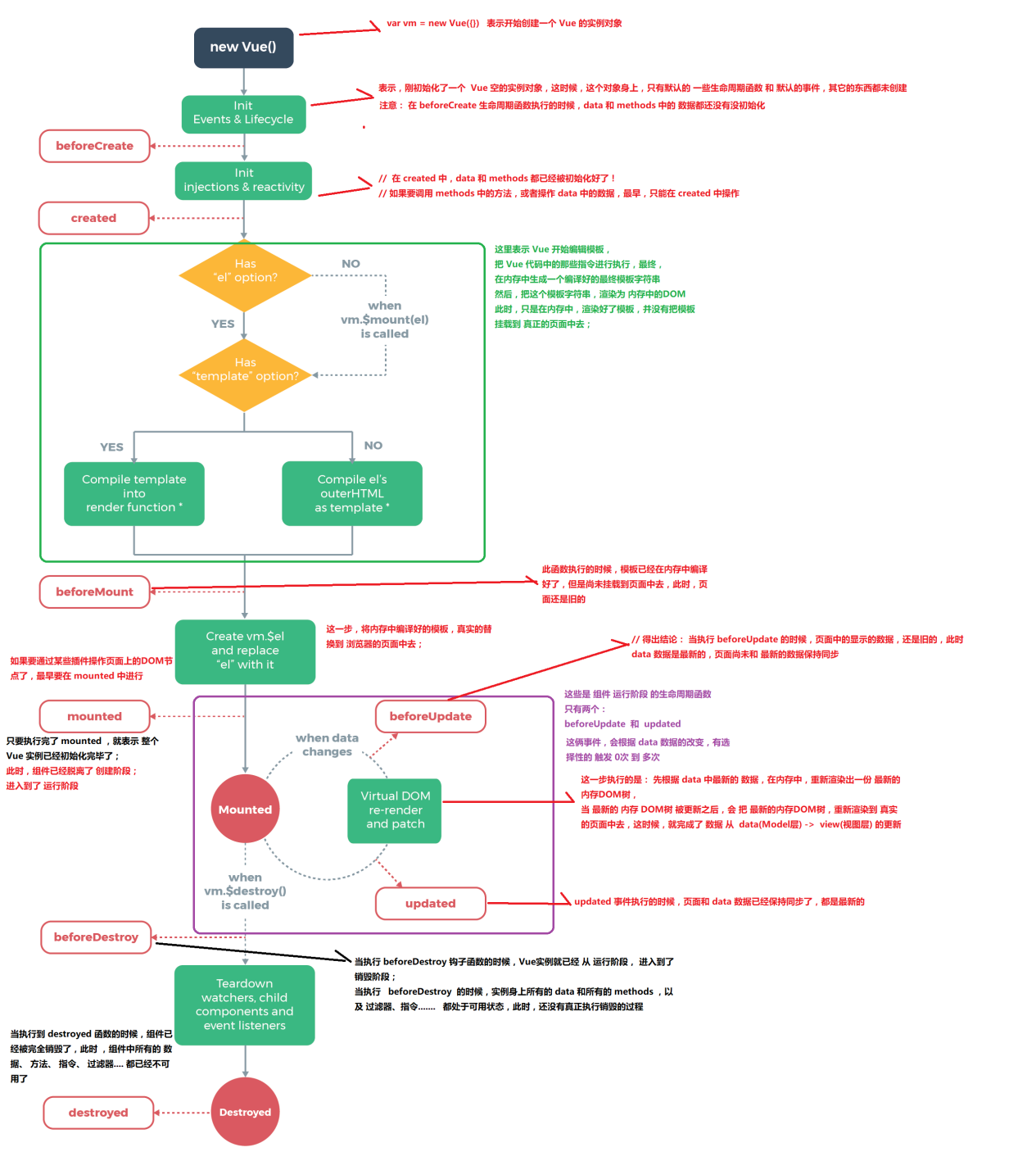
插槽
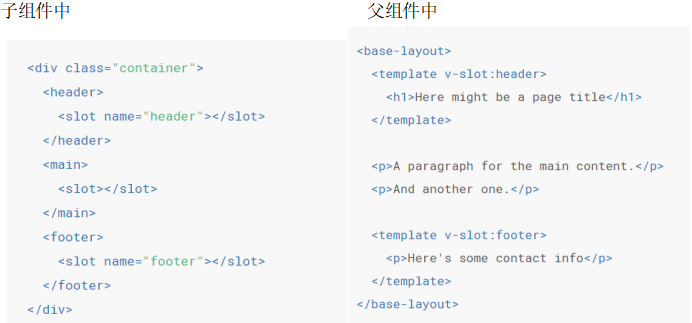
在子组件中预留插槽,父组件可以把内容放到插入到插槽中
具名插槽
- 一个不带
name的<slot>出口会带有隐含的名字“default” - 父组件中 template 标签里面用
v-slot指令命名 - 任何没有被包裹在带有 v-slot 的
<template>中的内容都会被视为默认插槽的内容
作用域插槽
- 子组件中
为了让 user 在父级的插槽内容中可用,我们可以将 user 作为 <slot> 元素的一个 attribute 绑定上去:
<span>
  <slot v-bind:user="user"> {{ user.lastName }} </slot>
</span>
- 父组件中
绑定在 <slot> 元素上的 attribute 被称为插槽 prop。现在在父级作用域中,我们可以使用带值的 v-slot 来定义我们提供的插槽 prop 的名字:
<current-user>
  <template v-slot:default="slotProps"> {{ slotProps.user.firstName }} </template>
</current-user>
在这个例子中,我们选择将包含所有插槽 prop 的对象命名为 slotProps,但你也可以使用任意你喜欢的名字。
具名插槽缩写
跟 v-on 和 v-bind 一样,v-slot 也有缩写,即把参数之前的所有内容 (v-slot:) 替换为字符 #。例如 v-slot:header 可以被重写为 #header:
<base-layout>
  <template #header>
    <h1>Here might be a page title</h1>
  </template>

  <p>A paragraph for the main content.</p>
  <p>And another one.</p>

  <template #footer>
    <p>Here's some contact info</p>
  </template>
</base-layout>
然而,和其它指令一样,该缩写只在其有参数的时候才可用。这意味着以下语法是无效的:
<!-- 这样会触发一个警告 -->
<current-user #="{ user }"> {{ user.firstName }} </current-user>

<!-- 如果你希望使用缩写的话,你必须始终以明确插槽名取而代之: -->
<current-user #default="{ user }"> {{ user.firstName }} </current-user>
计算属性&侦听
computed 对比 watch
watch
- 执行异步操作(发送请求)或者开销较大的操作
- 使用场景:一个数据影响多个数据(如搜索框匹配)
computed
- 可以缓存,当他依赖的响应式数据变化时才会重新计算
- 使用场景:一个数据受多个数据影响(如购物车)
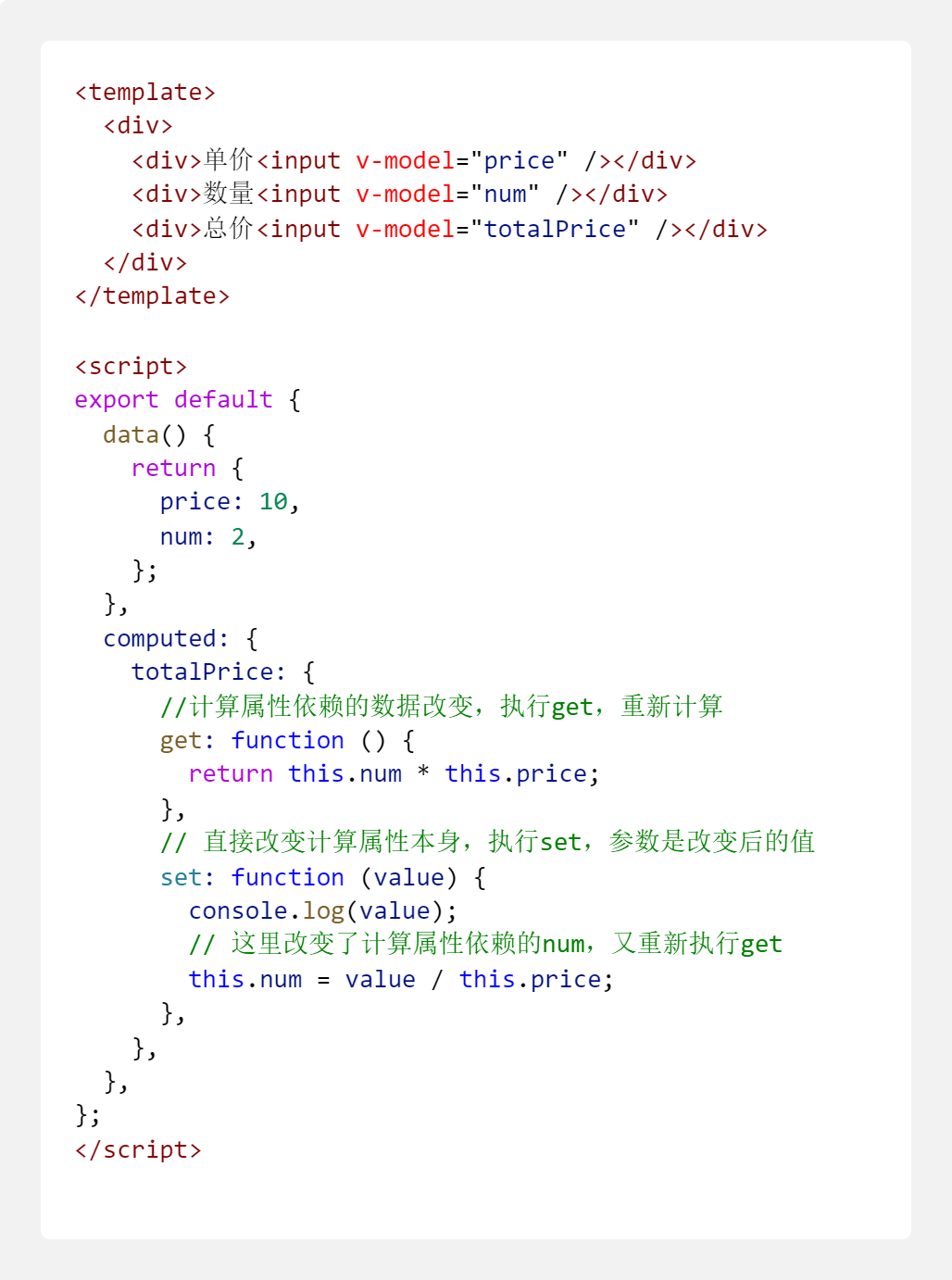
计算属性
不过你仍然可以将其实例作为函数的第一个参数来访问。
computed: {
  aDouble: vm => vm.a * 2;
}
计算属性的结果会被缓存,除非依赖的响应式 property 变化才会重新计算。注意,如果某个依赖 (比如非响应式 property) 在该实例范畴之外,则计算属性是不会被更新的。
computed: {
    // 计算属性的 getter
    sum () {
      // `this` 指向 vm 实例
      return this.num1 + this.num2
    }
  }
计算属性默认只有 getter,不过在需要时你也可以提供一个 setter:
侦听
虽然计算属性在大多数情况下更合适,但有时也需要一个自定义的侦听器。这就是为什么 Vue 通过 watch 选项提供了一个更通用的方法,来响应数据的变化。当需要在数据变化时执行异步或开销较大的操作时,这个方式是最有用的。
watch 完整写法:
watch:{
  handler (newVal, oldVal) {
    // 当 `a` 变化时调用
  },
  immediate: false // 立即执行一次
  deep: true // 深度监听 如果要监听的数据的层级很多
}
watch 监听对象内层的某个属性:
  data() {
    return {
      a: {
        b: {
          c: 1,
        },
      },
    };
  },
  watch: {
    // watch可以用 . 操作符监听对象里面的属性
    // 如果只想监听对象里面 c 的值,不要用深度监听
    "a.b.c": {
      handler: function (val, oldVal) {
        console.log(val, oldVal);
      },
    },
  },
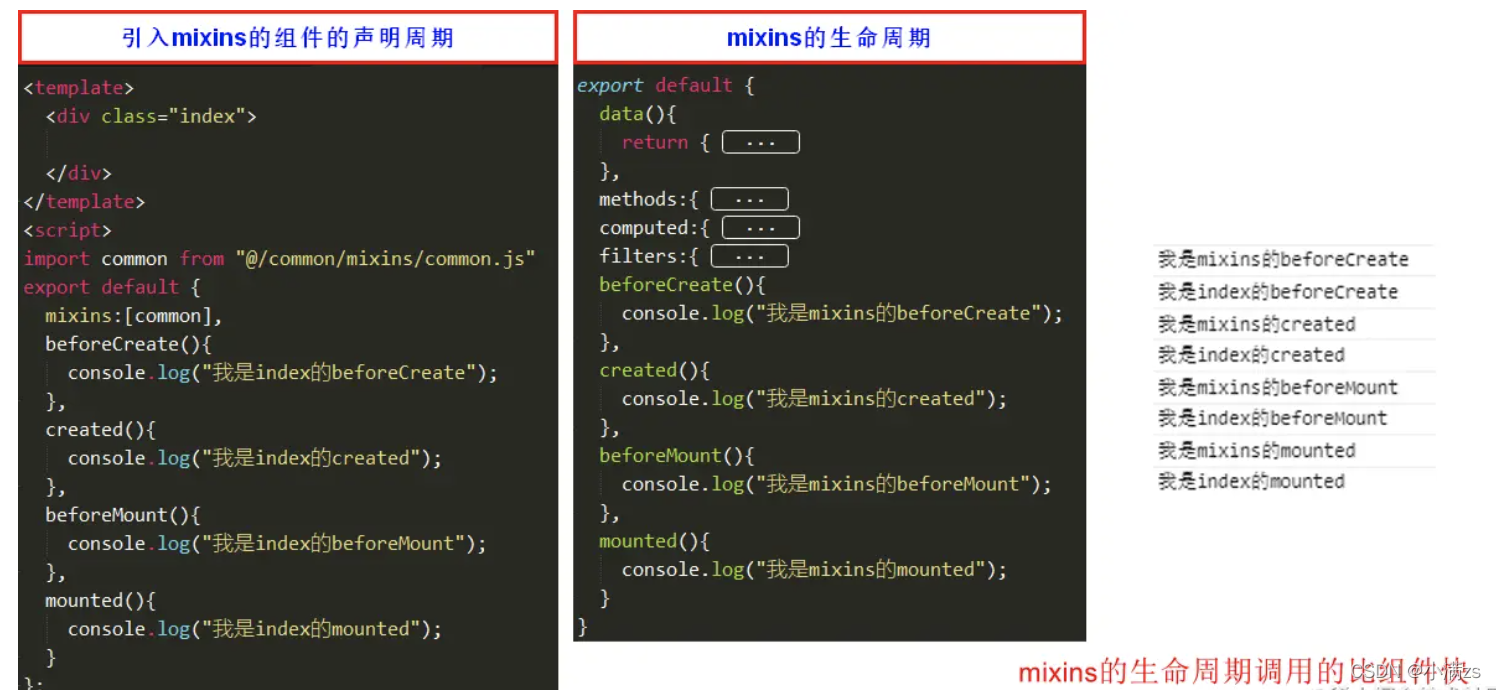
mixins
scoped
vue 中的 scoped 通过在 DOM 结构以及 css 样式上加唯一不重复的标记:data-v-hash 的方式,以保证唯一(而这个工作是由过 PostCSS 转译实现的),达到样式私有化模块化的目的。
scoped 三条渲染规则:
- 给 HTML 的 DOM 节点加一个不重复 data 属性(形如:data-v-123)来表示他的唯一性。
- 在每句 css 选择器的末尾(编译后的生成的 css 语句)加一个当前组件的 data 属性选择器(如data-v-123)来私有化样式,如果组件内部包含有其他组件,只会给其他组件的最外层标签加上当前组件的 data 属性。
- PostCSS 会给一个组件中的所有 dom 添加了一个独一无二的动态属性 data-v-xxxx,然后,给 CSS 选择器额外添加一个对应的属性选择器来选择该组件中 dom,这种做法使得样式只作用于含有该属性的 dom——组件内部 dom, 从而达到了'样式模块化'的效果。
Api
Vue.nextTick( callback, context )
场景:
vue 更新 dom 是异步的,如果一个数据改变了 n 次,dom 不会更新 n 次,vue 是拿最后一次更新去改变 dom。
所以在所有的任务队列完成之后才能拿到最新的 dom。
参数:
- {Function} callback
- {Object} context
用法:
- 在下次 DOM 更新循环结束之后执行延迟回调。在修改数据之后立即使用这个方法,获取更新后的 DOM。
// 修改数据
vm.msg = "Hello";
// DOM 还没有更新
Vue.nextTick(function () {
  // DOM 更新了
});

// 作为一个 Promise 使用
Vue.nextTick().then(function () {
  // DOM 更新了
});