工程化
网站部署
以此博客为例,服务器使用腾讯云,域名来自阿里云。
服务器
- 购买一台服务器 记录 ip
124.221.197.179 - 安装操作系统
- 进入服务器,安装项目运行环境,运行项目
http://localhost:3000 - 进入服务器控制台,打开服务器防火墙,开放项目所运行的端口,此处为
3000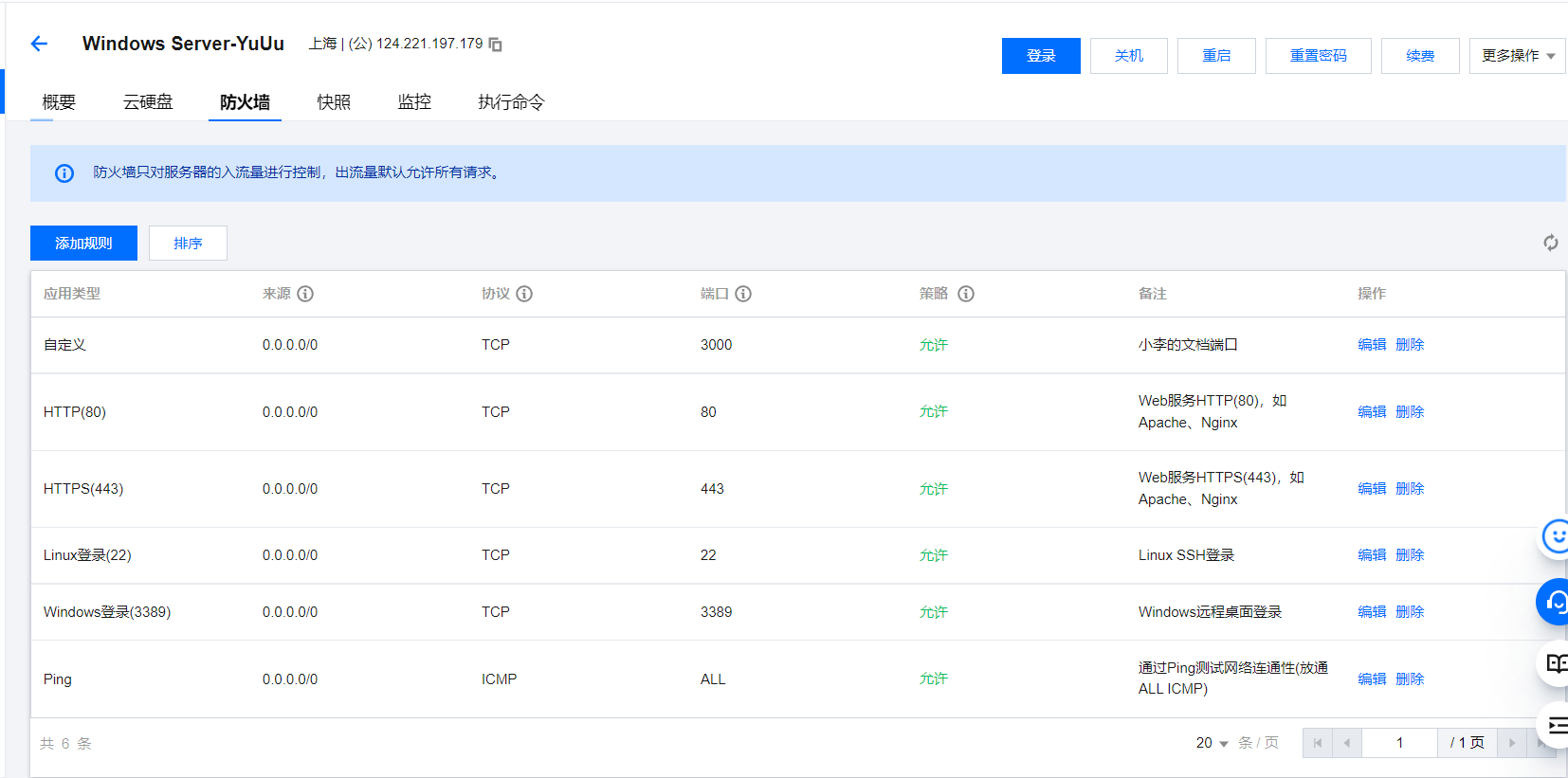
- 目前可以通过
http://124.221.197.179:3000访问到项目
域名
一定要备案,不然用不了
- 购买域名 lidoc.top
- 进入域名控制台,点击新手引导解析域名,记录值为服务器的 ip
124.221.197.179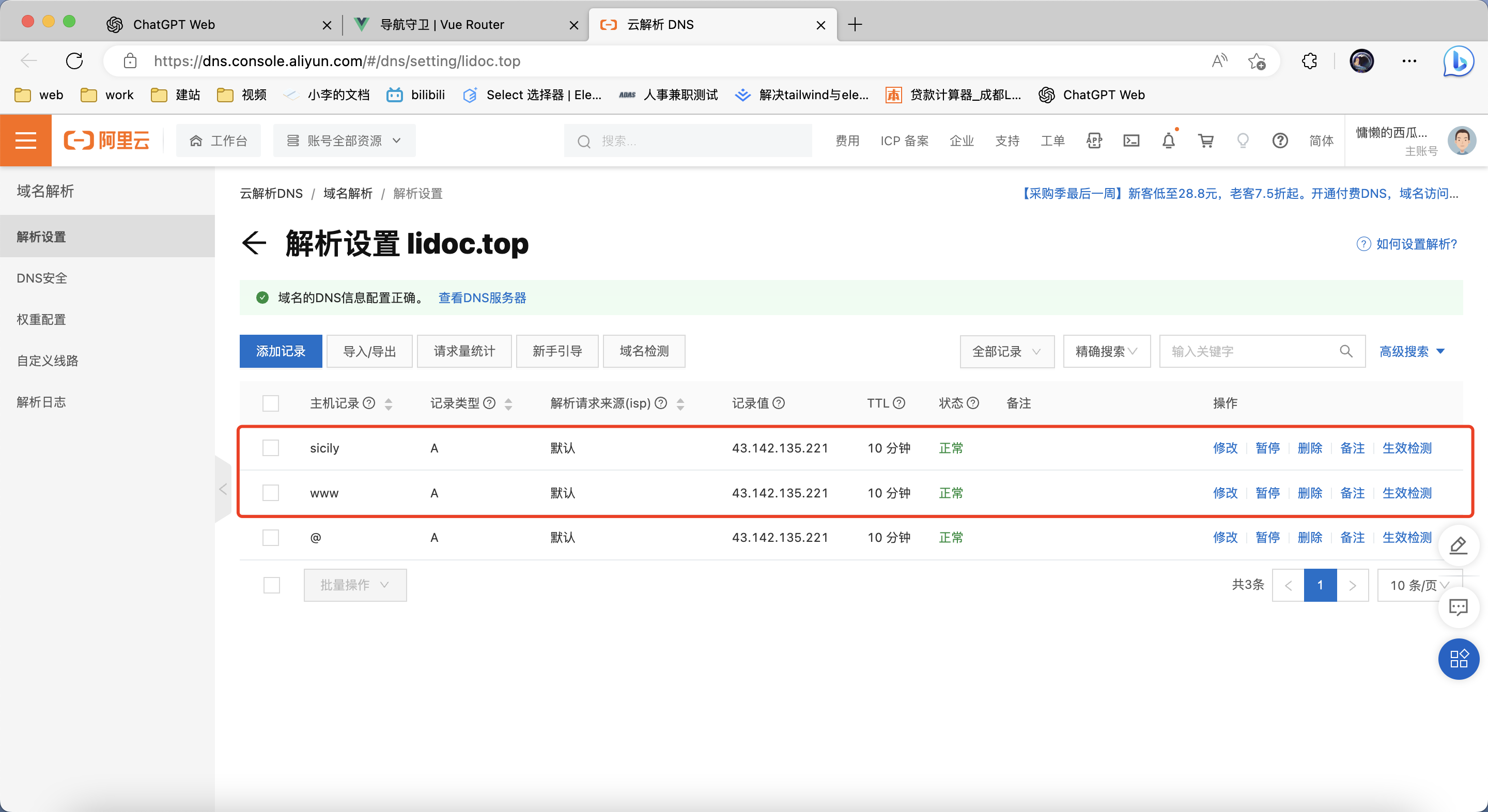
- 目前可以通过
http://www.lidoc.top:3000访问到项目
Nginx 代理
下面使用的是代理转发,更多用法见 serve -> nginx
虽然已经可以访问到项目,但是 url 后跟端口号并不好,这一步就是将 3000 端口的项目转发到 80 端口。(80 端口是默认端口,直接使用域名访问)
- 下载 Nginx 压缩包,打开
nginx/conf/nginx.conf文件进行配置 - 将默认文件中的注释删除后如下
worker_processes  auto;

events {
    worker_connections  1024;
}

http {
    include       mime.types;
    default_type  application/octet-stream;
    sendfile        on;
    keepalive_timeout  65;
    # 服务1  www.lidoc.top访问3000端口
    server {
        listen       80;
        server_name  www.lidoc.top;   #域名或服务器ip
        location / {
            proxy_pass http://localhost:3000;
            root   html;
            index  index.html index.htm;
        }
        error_page   500 502 503 504  /50x.html;
        location = /50x.html {
            root   html;
        }
    }
    # 服务2  sicily.lidoc.top访问4000端口
    server {
        listen       80;
        server_name  sicily.lidoc.top;   #域名或服务器ip
        location / {
            proxy_pass http://localhost:4000;
            root   html;
            index  index.html index.htm;
        }
        error_page   500 502 503 504  /50x.html;
        location = /50x.html {
            root   html;
        }
    }
}
- 运行 Nginx.exe,启动代理
更多 Nginx 配置可参考 https://zhuanlan.zhihu.com/p/108740468
iTerm2
输入前面的命令之后 按 Tab 键可以自动补全
mac 上的终端工具,可以使用 ssh 连接服务器
连接服务器
- 服务器开放 ssh 端口,一般是 22
- 启动服务器的 ssh 服务(可能需要安装)
- 在本地终端输入以下命令,输入密码后连接服务器
# ssh [用户名]@[服务器ip]
ssh Administrator@124.71.239.49
快捷连接
- 打开 iTerm2,点击
Profiles->Open Profiles->Edit Profiles-> 左下角 + General->Basics->Name输入名称General->Command->Command输入ssh Administrator@124.71.239.49- 打开 iTerm2,点击
Profiles就可以看到刚才创建的连接,点击连接即可
FileZilla
mac 上的 ftp 工具,可以使用 ftp 连接服务器(文件传输)
添加站点
- 打开 FileZilla,左上角按钮打开站点管理器
- 新建站点
- 右侧填写
协议:SFTP 主机:124.71.239.49 端口:不填或者22 登录类型: 正常 用户:XX 密码:xx - 点击连接
- 后面就可以直接打开站点管理器,点击连接即可