组件
TinyMCE 富文本编辑器
tinyMCE 富文本
在后台管理系统中富文本编辑器不可缺少
富文本是管理后台一个核心的功能,但同时又是一个有很多坑的地方。在选择富文本的过程中我也走了不少的弯路,市面上常见的富文本都基本用过了,最终权衡了一下选择了 Tinymce
tinymce 的去格式化相当的好,它还有一些增值服务(付费插件),最好用的就是 powerpaste,非常的强大,支持从 word 里面复制各种东西,而且还帮你顺带格式化了。富文本还有一点也很关键,就是拓展性。楼主用 tinymce 写了好几个插件,学习成本和容易度都不错,很方便拓展。最后一点就是文档很完善,基本你想得到的配置项,它都有。tinymce 也支持按需加载,你可以通过它官方的 build 页定制自己需要的 plugins。
封装 Tiny 的组件,如果是用在 Dialog 或 Drawer 里面,关闭时需要销毁 Dialog 或者 Drawer。否则其他页面的 Tiny 显示不出来
vue3 & tinyMce
组件封装
组件目录,此封装基于 vue3,element Plus
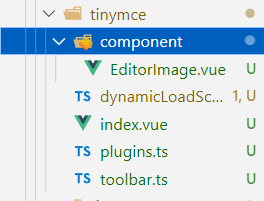
EditorImage.vue 上传文件
<template>
  <div class="upload-container">
    <el-button
      :style="{ background: props.color, borderColor: props.color }"
      type="primary"
      size="small"
      :icon="UploadFilled"
      @click="dialogVisible = true"
    >
      上传
    </el-button>

    <el-dialog v-model="dialogVisible">
      <el-upload
        :file-list="fileList"
        :show-file-list="true"
        :on-remove="handleRemove"
        :on-success="handleSuccess"
        :before-upload="beforeUpload"
        class="editor-slide-upload upload-demo"
        action="https://httpbin.org/post"
        drag
        multiple
      >
        <el-icon class="el-icon--upload"><upload-filled /></el-icon>
        <div class="el-upload__text">
          移动文件到此处或 <em>点击上传文件</em>
        </div>
        <template #tip>
          <div class="el-upload__tip">
            jpg/png files with a size less than 500kb
          </div>
        </template>
      </el-upload>

      <template #footer>
        <span class="dialog-footer">
          <el-button @click="dialogVisible = false"> 取消 </el-button>
          <el-button type="primary" @click="handleSubmit"> 确认 </el-button>
        </span>
      </template>
    </el-dialog>
  </div>
</template>
<script setup lang="ts">
import { ref, reactive } from "vue";
import { ElMessage } from "element-plus";
import { UploadFilled } from "@element-plus/icons-vue";

interface Props {
  color?: string;
}

const props = withDefaults(defineProps<Props>(), {
  color: "#1890ff"
});

const emit = defineEmits(["successCBK"]);

const dialogVisible = ref(false);
let listObj = reactive({});
const fileList = ref([]);

const checkAllSuccess = () => {
  return Object.keys(listObj).every((item) => listObj[item].hasSuccess);
};

const handleSubmit = () => {
  const arr = Object.keys(listObj).map((v) => listObj[v]);
  if (!checkAllSuccess()) {
    ElMessage(
      "Please wait for all images to be uploaded successfully. If there is a network problem, please refresh the page and upload again!"
    );
    return;
  }
  emit("successCBK", arr);
  listObj = {};
  fileList.value = [];
  dialogVisible.value = false;
};

const handleSuccess = (response: any, file: any) => {
  const uid = file.uid;
  const objKeyArr = Object.keys(listObj);
  for (let i = 0, len = objKeyArr.length; i < len; i++) {
    if (listObj[objKeyArr[i]].uid === uid) {
      listObj[objKeyArr[i]].url = response.files.file;
      listObj[objKeyArr[i]].hasSuccess = true;
      return;
    }
  }
};

const handleRemove = (file: any) => {
  const uid = file.uid;
  const objKeyArr = Object.keys(listObj);
  for (let i = 0, len = objKeyArr.length; i < len; i++) {
    if (listObj[objKeyArr[i]].uid === uid) {
      delete listObj[objKeyArr[i]];
      return;
    }
  }
};

const beforeUpload = (file: any) => {
  const _URL = window.URL || window.webkitURL;
  const fileName = file.uid;
  listObj[fileName] = {}; // eslint-disable-next-line no-unused-vars
  return new Promise((resolve) => {
    const img = new Image();
    img.src = _URL.createObjectURL(file);
    img.onload = function () {
      listObj[fileName] = {
        hasSuccess: false,
        uid: file.uid,
        width: img.width,
        height: img.height
      };
    };
    resolve(true);
  });
};
</script>

<style lang="scss" scoped>
.editor-slide-upload {
  margin-bottom: 20px;

  :deep(.el-upload--picture-card) {
    width: 100%;
  }
}
</style>
dynamicLoadScript.ts
let callbacks: any = [];
function loadedTinymce() {
  // to fixed https://github.com/PanJiaChen/vue-element-admin/issues/2144
  // check is successfully downloaded script
  return window.tinymce;
}
const dynamicLoadScript = (src: string, callback: Function) => {
  const existingScript = document.getElementById(src);
  const cb = callback || function () {};
  if (!existingScript) {
    const script = document.createElement("script");
    script.src = src; // src url for the third-party library being loaded.
    script.id = src;
    document.body.appendChild(script);
    callbacks.push(cb);
    const onEnd = "onload" in script ? stdOnEnd : ieOnEnd;
    onEnd(script);
  }
  if (existingScript && cb) {
    if (loadedTinymce()) {
      cb(null, existingScript);
    } else {
      callbacks.push(cb);
    }
  }
  function stdOnEnd(script: HTMLScriptElement) {
    script.onload = function () {
      // this.onload = null here is necessary
      // because even IE9 works not like others
      this.onerror = this.onload = null;
      for (const cb of callbacks) {
        cb(null, script);
      }
      callbacks = null;
    };
    script.onerror = function () {
      this.onerror = this.onload = null;
      cb(new Error("Failed to load " + src), script);
    };
  }
  function ieOnEnd(script: any) {
    script.onreadystatechange = function () {
      if (this.readyState !== "complete" && this.readyState !== "loaded") {
        return;
      }
      this.onreadystatechange = null;
      for (const cb of callbacks) {
        cb(null, script); // there is no way to catch loading errors in IE8
      }
      callbacks = null;
    };
  }
};
export default dynamicLoadScript;
plugins.ts
// Any plugins you want to use has to be imported
// Detail plugins list see https://www.tinymce.com/docs/plugins/
// 中文地址 http://tinymce.ax-z.cn/plugins/advlist.php
const plugins = [
  "advlist anchor autolink autosave code codesample colorpicker colorpicker contextmenu directionality emoticons fullscreen hr image imagetools insertdatetime link lists media nonbreaking noneditable pagebreak paste preview print save searchreplace spellchecker tabfocus table template textcolor textpattern visualblocks visualchars wordcount"
];
export default plugins;
toolbar.ts
// Here is a list of the toolbar
// Detail list see https://www.tinymce.com/docs/advanced/editor-control-identifiers/#toolbarcontrols
const toolbar = [
  "searchreplace bold italic underline strikethrough alignleft aligncenter alignright outdent indent  blockquote undo redo removeformat subscript superscript code codesample",
  "hr bullist numlist link image charmap preview anchor pagebreak insertdatetime media table emoticons forecolor backcolor fullscreen"
];
export default toolbar;
index.vue
<template>
<div
:class="{ fullscreen: fullscreen }"
class="tinymce-container"
:style="{ width: containerWidth }"
>
<textarea :id="tinymceId" class="tinymce-textarea" />
<div class="editor-custom-btn-container">
<!-- eslint-disable-next-line vue/v-on-event-hyphenation -->
<editorImage
color="#1890ff"
class="editor-upload-btn"
@successCBK="imageSuccessCBK"
/>
</div>
</div>
</template>
<script lang="ts" setup>
import editorImage from "./component/EditorImage.vue";
import plugins from "./plugins";
import toolbar from "./toolbar";
import load from "./dynamicLoadScript";
import {
ref,
computed,
watch,
nextTick,
onMounted,
onActivated,
onDeactivated,
onBeforeUnmount
} from "vue";
import { ElMessage } from "element-plus";
const tinymceCDN =
"https://cdn.jsdelivr.net/npm/tinymce-all-in-one@4.9.3/tinymce.min.js";
interface Props {
id?: string;
value?: string;
toolbar?: any[] | any;
menubar?: string;
height?: string;
width?: string;
}
const props = withDefaults(defineProps<Props>(), {
id: "vue-tinymce-" + +new Date() + ((Math.random() * 1000).toFixed(0) + ""),
value: "",
toolbar: () => [],
menubar: "file edit insert view format table",
height: "360",
width: "auto"
});
const emit = defineEmits(["update:value"]);
const hasChange = ref(false);
const hasInit = ref(false);
const tinymceId = ref(props.id);
const fullscreen = ref(false);
const language = computed(() => {
return "zh_CN";
});
const containerWidth = computed(() => {
const width = props.width;
if (/^[\d]+(\.[\d]+)?$/.test(width)) {
// matches `100`, `'100'`
return `${width}px`;
}
return width;
});
const initTinymce = () => {
window.tinymce.init({
language: language.value,
selector: `#${tinymceId.value}`,
height: props.height,
body_class: "panel-body ",
object_resizing: false,
toolbar: props.toolbar.length > 0 ? props.toolbar : toolbar,
menubar: props.menubar,
plugins: plugins,
end_container_on_empty_block: true,
powerpaste_word_import: "clean",
code_dialog_height: 450,
code_dialog_width: 1000,
advlist_bullet_styles: "square",
advlist_number_styles: "default",
imagetools_cors_hosts: ["www.tinymce.com", "codepen.io"],
default_link_target: "_blank",
link_title: false,
nonbreaking_force_tab: true, // inserting nonbreaking space need Nonbreaking Space Plugin
init_instance_callback: (editor: any) => {
if (props.value) {
editor.setContent(props.value);
}
hasInit.value = true;
editor.on("NodeChange Change KeyUp SetContent", () => {
hasChange.value = true;
emit("update:value", editor.getContent());
});
},
setup(editor: any) {
editor.on("FullscreenStateChanged", (e: any) => {
fullscreen.value = e.state;
});
}, // it will try to keep these URLs intact // https://www.tiny.cloud/docs-3x/reference/configuration/Configuration3x@convert_urls/ // https://stackoverflow.com/questions/5196205/disable-tinymce-absolute-to-relative-url-conversions
convert_urls: false // 整合七牛上传 // images_dataimg_filter(img) { // setTimeout(() => { // const $image = $(img); // $image.removeAttr('width'); // $image.removeAttr('height'); // if ($image[0].height && $image[0].width) { // $image.attr('data-wscntype', 'image'); // $image.attr('data-wscnh', $image[0].height); // $image.attr('data-wscnw', $image[0].width); // $image.addClass('wscnph'); // } // }, 0); // return img // }, // images_upload_handler(blobInfo, success, failure, progress) { // progress(0); // const token = _this.$store.getters.token; // getToken(token).then(response => { // const url = response.data.qiniu_url; // const formData = new FormData(); // formData.append('token', response.data.qiniu_token); // formData.append('key', response.data.qiniu_key); // formData.append('file', blobInfo.blob(), url); // upload(formData).then(() => { // success(url); // progress(100); // }) // }).catch(err => { // failure('出现未知问题,刷新页面,或者联系程序员') // console.log(err); // }); // },
});
};
const init = () => {
// dynamic load tinymce from cdn
load(tinymceCDN, (err: any) => {
if (err) {
ElMessage(err.message);
return;
}
initTinymce();
});
};
const destroyTinymce = () => {
const tinymce = window.tinymce.get(tinymceId.value);
if (fullscreen.value) {
tinymce.execCommand("mceFullScreen");
}
if (tinymce) {
tinymce.destroy();
}
};
const setContent = (value: any) => {
window.tinymce.get(tinymceId.value).setContent(value);
};
const getContent = () => {
window.tinymce.get(tinymceId.value).getContent();
};
const imageSuccessCBK = (arr: any) => {
arr.forEach((v: any) =>
window.tinymce
.get(tinymceId.value)
.insertContent(`<img class="wscnph" src="${v.url}" >`)
);
};
watch(
() => props.value,
(val) => {
if (hasInit.value) {
nextTick(() => {
const editor = window.tinymce.get(tinymceId.value);
editor.setContent(val || "");
editor.selection.select(editor.getBody(), true);
editor.selection.collapse(false);
});
}
}
);
watch(language, () => {
destroyTinymce();
nextTick(() => initTinymce());
});
onMounted(() => {
init();
});
onActivated(() => {
if (window.tinymce) {
initTinymce();
}
});
onDeactivated(() => {
destroyTinymce();
});
onBeforeUnmount(() => {
destroyTinymce();
});
</script>
<style lang="scss" scoped>
.tinymce-container {
position: relative;
line-height: normal;
}
.tinymce-container {
::v-deep {
.mce-fullscreen {
z-index: 10000;
}
}
}
.tinymce-textarea {
visibility: hidden;
z-index: -1;
}
.editor-custom-btn-container {
position: absolute;
right: 4px;
top: 4px;
/*z-index: 2005;*/
}
.fullscreen .editor-custom-btn-container {
z-index: 10000;
position: fixed;
}
.editor-upload-btn {
display: inline-block;
}
</style>
组件使用
组件属性
| Property | Description | Type | Default |
|---|---|---|---|
| id | Component unique identifier | String | Default to help you generate a unique id |
| value | Rich text content | String | Only monitor changes once |
| toolbar | Rich text toolbar | Array | |
| menubar | Rich text menubar | String | 'file edit insert view format table' |
| height | Rich text height | Number | 360 |
| width | Rich text width | Number, String | / |
使用
高度是指 tinyMCE 文本域的高度
输入的图片会转换成 base64
content 指的是文本域的内容
<template>
  <div class="contain">
    <Tiny v-model:value="content" width="800" height="400" />
  </div>
</template>

<script lang="ts" setup>
import Tiny from '@/view/tinymce/index.vue'
import { ref } from 'vue'
const content = ref('')
</script>

<style scoped>
.contain {
  height: 100vh;
  display: flex;
  justify-content: center;
  align-items: center;
}
</style>

</style>
vue2 & tinyMce
组件封装
组件目录,此封装基于 vue2,elementUi
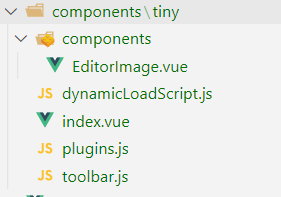
EditorImage.vue 上传文件
<template>

  <div class="upload-container">

    <el-button
      :style="{ background: color, borderColor: color }"
      icon="el-icon-upload"
      size="mini"
      type="primary"
      @click="dialogVisible = true"
    >
            upload
    </el-button>

    <el-dialog :visible.sync="dialogVisible">

      <el-upload
        :multiple="true"
        :file-list="fileList"
        :show-file-list="true"
        :on-remove="handleRemove"
        :on-success="handleSuccess"
        :before-upload="beforeUpload"
        class="editor-slide-upload"
        action="https://httpbin.org/post"
        list-type="picture-card"
      >

        <el-button size="small" type="primary"> Click upload </el-button>
      </el-upload>
            <el-button @click="dialogVisible = false"> Cancel </el-button>
      <el-button type="primary" @click="handleSubmit"> Confirm </el-button>
    </el-dialog>

  </div>
</template>
<script>
// import { getToken } from 'api/qiniu'
export default {
  name: "EditorSlideUpload",
  props: {
    color: {
      type: String,
      default: "#1890ff"
    }
  },
  data() {
    return {
      dialogVisible: false,
      listObj: {},
      fileList: []
    };
  },
  methods: {
    checkAllSuccess() {
      return Object.keys(this.listObj).every(
        (item) => this.listObj[item].hasSuccess
      );
    },
    handleSubmit() {
      const arr = Object.keys(this.listObj).map((v) => this.listObj[v]);
      if (!this.checkAllSuccess()) {
        this.$message(
          "Please wait for all images to be uploaded successfully. If there is a network problem, please refresh the page and upload again!"
        );
        return;
      }
      this.$emit("successCBK", arr);
      this.listObj = {};
      this.fileList = [];
      this.dialogVisible = false;
    },
    handleSuccess(response, file) {
      const uid = file.uid;
      const objKeyArr = Object.keys(this.listObj);
      for (let i = 0, len = objKeyArr.length; i < len; i++) {
        if (this.listObj[objKeyArr[i]].uid === uid) {
          this.listObj[objKeyArr[i]].url = response.files.file;
          this.listObj[objKeyArr[i]].hasSuccess = true;
          return;
        }
      }
    },
    handleRemove(file) {
      const uid = file.uid;
      const objKeyArr = Object.keys(this.listObj);
      for (let i = 0, len = objKeyArr.length; i < len; i++) {
        if (this.listObj[objKeyArr[i]].uid === uid) {
          delete this.listObj[objKeyArr[i]];
          return;
        }
      }
    },
    beforeUpload(file) {
      const _self = this;
      const _URL = window.URL || window.webkitURL;
      const fileName = file.uid;
      this.listObj[fileName] = {}; // eslint-disable-next-line no-unused-vars
      return new Promise((resolve, reject) => {
        const img = new Image();
        img.src = _URL.createObjectURL(file);
        img.onload = function () {
          _self.listObj[fileName] = {
            hasSuccess: false,
            uid: file.uid,
            width: this.width,
            height: this.height
          };
        };
        resolve(true);
      });
    }
  }
};
</script>
<style lang="scss" scoped>
.editor-slide-upload {
  margin-bottom: 20px;
  ::v-deep .el-upload--picture-card {
    width: 100%;
  }
}
</style>
dynamicLoadScript.js
let callbacks = [];
function loadedTinymce() {
  // to fixed https://github.com/PanJiaChen/vue-element-admin/issues/2144
  // check is successfully downloaded script
  return window.tinymce;
}
const dynamicLoadScript = (src, callback) => {
  const existingScript = document.getElementById(src);
  const cb = callback || function () {};
  if (!existingScript) {
    const script = document.createElement("script");
    script.src = src; // src url for the third-party library being loaded.
    script.id = src;
    document.body.appendChild(script);
    callbacks.push(cb);
    const onEnd = "onload" in script ? stdOnEnd : ieOnEnd;
    onEnd(script);
  }
  if (existingScript && cb) {
    if (loadedTinymce()) {
      cb(null, existingScript);
    } else {
      callbacks.push(cb);
    }
  }
  function stdOnEnd(script) {
    script.onload = function () {
      // this.onload = null here is necessary
      // because even IE9 works not like others
      this.onerror = this.onload = null;
      for (const cb of callbacks) {
        cb(null, script);
      }
      callbacks = null;
    };
    script.onerror = function () {
      this.onerror = this.onload = null;
      cb(new Error("Failed to load " + src), script);
    };
  }
  function ieOnEnd(script) {
    script.onreadystatechange = function () {
      if (this.readyState !== "complete" && this.readyState !== "loaded")
        return;
      this.onreadystatechange = null;
      for (const cb of callbacks) {
        cb(null, script); // there is no way to catch loading errors in IE8
      }
      callbacks = null;
    };
  }
};
export default dynamicLoadScript;
plugins.js
// Any plugins you want to use has to be imported
// Detail plugins list see https://www.tinymce.com/docs/plugins/
// Custom builds see https://www.tinymce.com/download/custom-builds/
const plugins = [
  "advlist anchor autolink autosave code codesample colorpicker colorpicker contextmenu directionality emoticons fullscreen hr image imagetools insertdatetime link lists media nonbreaking noneditable pagebreak paste preview print save searchreplace spellchecker tabfocus table template textcolor textpattern visualblocks visualchars wordcount"
];
export default plugins;
toolbar.js
// Here is a list of the toolbar
// Detail list see https://www.tinymce.com/docs/advanced/editor-control-identifiers/#toolbarcontrols
const toolbar = [
  "searchreplace bold italic underline strikethrough alignleft aligncenter alignright outdent indent  blockquote undo redo removeformat subscript superscript code codesample",
  "hr bullist numlist link image charmap preview anchor pagebreak insertdatetime media table emoticons forecolor backcolor fullscreen"
];
export default toolbar;
index.vue
<template>
<div
:class="{ fullscreen: fullscreen }"
class="tinymce-container"
:style="{ width: containerWidth }"
>
<textarea :id="tinymceId" class="tinymce-textarea" />
<div class="editor-custom-btn-container">
<editorImage
color="#1890ff"
class="editor-upload-btn"
@successCBK="imageSuccessCBK"
/>
</div>
</div>
</template>
<script>
/**
* docs:
* https://panjiachen.github.io/vue-element-admin-site/feature/component/rich-editor.html#tinymce
*/
import editorImage from "./components/EditorImage";
import plugins from "./plugins";
import toolbar from "./toolbar";
import load from "./dynamicLoadScript";
// why use this cdn, detail see https://github.com/PanJiaChen/tinymce-all-in-one
const tinymceCDN =
"https://cdn.jsdelivr.net/npm/tinymce-all-in-one@4.9.3/tinymce.min.js";
export default {
name: "Tinymce",
components: { editorImage },
props: {
id: {
type: String,
default: function () {
return (
"vue-tinymce-" +
+new Date() +
((Math.random() * 1000).toFixed(0) + "")
);
}
},
value: {
type: String,
default: ""
},
toolbar: {
type: Array,
required: false,
default() {
return [];
}
},
menubar: {
type: String,
default: "file edit insert view format table"
},
height: {
type: [Number, String],
required: false,
default: 360
},
width: {
type: [Number, String],
required: false,
default: "auto"
}
},
data() {
return {
hasChange: false,
hasInit: false,
tinymceId: this.id,
fullscreen: false
};
},
computed: {
language() {
return "zh_CN";
},
containerWidth() {
const width = this.width;
if (/^[\d]+(\.[\d]+)?$/.test(width)) {
// matches `100`, `'100'`
return `${width}px`;
}
return width;
}
},
watch: {
value(val) {
if (this.hasInit) {
this.$nextTick(() =>
const editor = window.tinymce.get(tinymceId.value);
editor.setContent(val || '');
editor.selection.select(editor.getBody(), true);
editor.selection.collapse(false);
);
}
},
language() {
this.destroyTinymce();
this.$nextTick(() => this.initTinymce());
}
},
mounted() {
this.init();
},
activated() {
if (window.tinymce) {
this.initTinymce();
}
},
deactivated() {
this.destroyTinymce();
},
destroyed() {
this.destroyTinymce();
},
methods: {
init() {
// dynamic load tinymce from cdn
load(tinymceCDN, (err) => {
if (err) {
this.$message.error(err.message);
return;
}
this.initTinymce();
});
},
initTinymce() {
const _this = this;
window.tinymce.init({
language: this.language,
selector: `#${this.tinymceId}`,
height: this.height,
body_class: "panel-body ",
object_resizing: false,
toolbar: this.toolbar.length > 0 ? this.toolbar : toolbar,
menubar: this.menubar,
plugins: plugins,
end_container_on_empty_block: true,
powerpaste_word_import: "clean",
code_dialog_height: 450,
code_dialog_width: 1000,
advlist_bullet_styles: "square",
advlist_number_styles: "default",
imagetools_cors_hosts: ["www.tinymce.com", "codepen.io"],
default_link_target: "_blank",
link_title: false,
nonbreaking_force_tab: true, // inserting nonbreaking space need Nonbreaking Space Plugin
init_instance_callback: (editor) => {
if (_this.value) {
editor.setContent(_this.value);
}
_this.hasInit = true;
editor.on("NodeChange Change KeyUp SetContent", () => {
this.hasChange = true;
this.$emit("input", editor.getContent());
});
},
setup(editor) {
editor.on("FullscreenStateChanged", (e) => {
_this.fullscreen = e.state;
});
}, // it will try to keep these URLs intact // https://www.tiny.cloud/docs-3x/reference/configuration/Configuration3x@convert_urls/ // https://stackoverflow.com/questions/5196205/disable-tinymce-absolute-to-relative-url-conversions
convert_urls: false // 整合七牛上传 // images_dataimg_filter(img) { // setTimeout(() => { // const $image = $(img); // $image.removeAttr('width'); // $image.removeAttr('height'); // if ($image[0].height && $image[0].width) { // $image.attr('data-wscntype', 'image'); // $image.attr('data-wscnh', $image[0].height); // $image.attr('data-wscnw', $image[0].width); // $image.addClass('wscnph'); // } // }, 0); // return img // }, // images_upload_handler(blobInfo, success, failure, progress) { // progress(0); // const token = _this.$store.getters.token; // getToken(token).then(response => { // const url = response.data.qiniu_url; // const formData = new FormData(); // formData.append('token', response.data.qiniu_token); // formData.append('key', response.data.qiniu_key); // formData.append('file', blobInfo.blob(), url); // upload(formData).then(() => { // success(url); // progress(100); // }) // }).catch(err => { // failure('出现未知问题,刷新页面,或者联系程序员') // console.log(err); // }); // },
});
},
destroyTinymce() {
const tinymce = window.tinymce.get(this.tinymceId);
if (this.fullscreen) {
tinymce.execCommand("mceFullScreen");
}
if (tinymce) {
tinymce.destroy();
}
},
setContent(value) {
window.tinymce.get(this.tinymceId).setContent(value);
},
getContent() {
window.tinymce.get(this.tinymceId).getContent();
},
imageSuccessCBK(arr) {
arr.forEach((v) =>
window.tinymce
.get(this.tinymceId)
.insertContent(`<img class="wscnph" src="${v.url}" >`)
);
}
}
};
</script>
<style lang="scss" scoped>
.tinymce-container {
position: relative;
line-height: normal;
}
.tinymce-container {
::v-deep {
.mce-fullscreen {
z-index: 10000;
}
}
}
.tinymce-textarea {
visibility: hidden;
z-index: -1;
}
.editor-custom-btn-container {
position: absolute;
right: 4px;
top: 4px;
/*z-index: 2005;*/
}
.fullscreen .editor-custom-btn-container {
z-index: 10000;
position: fixed;
}
.editor-upload-btn {
display: inline-block;
}
</style>
组件使用
组件属性
| Property | Description | Type | Default |
|---|---|---|---|
| id | Component unique identifier | String | Default to help you generate a unique id |
| value | Rich text content | String | Only monitor changes once |
| toolbar | Rich text toolbar | Array | |
| menubar | Rich text menubar | String | 'file edit insert view format table' |
| height | Rich text height | Number | 360 |
| width | Rich text width | Number, String | / |
使用
高度是指 tinyMCE 文本域的高度
输入的图片会转换成 base64
content 指的是文本域的内容
<template>
  <div>
    <Tinymce v-model="content" :height="300" />
  </div>
</template>
<script>
import Tinymce from "./components/tiny/index.vue";
export default {
  components: { Tinymce },
  data() {
    return { content: "" };
  }
};
</script>