后端
MySQL
MySQL 远程连接
SQL 语句以分号结束。不要为
root 开放任意来源的远程登录,应创建权限和来源范围受限的账号。先以管理员身份登录:mysql -u root -p。按实际数据库名、来源网段和强密码替换下面的示例值:
CREATE USER 'app_user'@'10.%' IDENTIFIED BY '<strong-password>';
GRANT SELECT, INSERT, UPDATE, DELETE ON app_db.* TO 'app_user'@'10.%';
还需检查 MySQL 的监听地址以及防火墙规则;只允许可信来源连接。使用 CREATE USER 和 GRANT 后无需再执行 FLUSH PRIVILEGES。
MySQL
SQL 语句
sql 语句之间要用 ; 分隔开
1.增删改查
基础操作
-- 共有三列数据 id name age

select * from table_name;
select name from table_name;
select name,age from table_name;

insert into table_name(name,age) values('张三',18);
insert into table_name values(1,'李四',19);

update table_name set name='王五' where id=1;

delete from table_name where id=1;
使用 set 插入
insert into table_name set name='赵六',age=18;
2.where、and、or
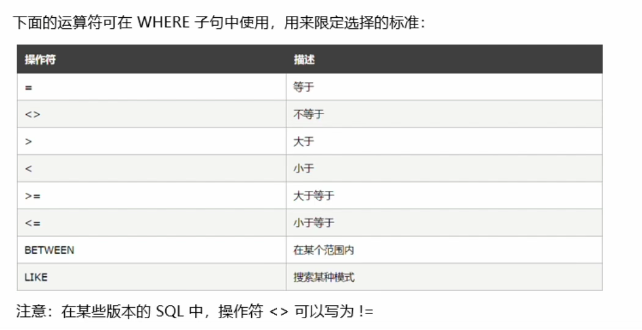
where 一般用于限定 SQL 语句的条件
and&or 可以在 where 中把多个条件结合起来
3.order by
order by 用于根据指定的列对结果集进行排序
默认是升序,如果要使用降序,可以使用 desc 关键字
select * from table_name order by id;
select * from table_name order by id desc;
多重排序:有多个排序的条件时,由逗号分隔
select * from table_name order by id desc,age asc;
4.count(*)&as
count(*)用于返回查询结果的条数
select count(*) from table_name where age=18;
as:为列设置别名
select count(*) as total from table_name;
select name as 用户名,age as 年龄 from table_name;
5.limt&like
使用于分页查询等应用场景
下列代码表示从第 5 个数据开始,查 6 个数据
select * from table_name limit 4,6;
limit 于 like 结合使用
select * from table_name where name like '%张%' limit 4,6;
select * from (select * from table_name limit 1,7) a where a.name like '%张%';