JavaScript
TypeScript
TypeScript
TypeScript 是 JavaScript 的超集,扩展了 JavaScript 的语法,因此现有的 JavaScript 代码可与 TypeScript 一起工作无需任何修改,TypeScript 通过类型注解提供编译时的静态类型检查。TypeScript 可处理已有的 JavaScript 代码,并只对其中的 TypeScript 代码进行编译。
定义静态类型
使用了静态类型,不仅意味着变量的类型不可以改变,还意味着类型的属性和方法也跟着确定了
基础定义
//常用的类型 null,undefinde,symbol,boolean,void
const count: number = 1;
const name: string = "xxxxx";
接口定义
//接口名首字母一般大写
interface Person {
  uname: string;
  age: number;
}

const xiaohong: Person = {
  uname: "小红",
  age: 18
};
对象类型
对象类型、数组类型、类类型、函数类型都叫对象类型
- 数组类型
//定义一个字符串数组
const people: string[] = ["谢大脚", "刘英", "小红"];
const people1: Array<string> = ["谢大脚", "刘英", "小红"];

//定义 字符串或者数字 组成的数组
const people: (string | number)[] = ["谢大脚", "刘英", "小红", 1];
const people1: Array<string | number> = ["谢大脚", "刘英", 1];
- 对象类型(不要这么写,一般用定义接口的写法)
const xiaoJieJie: {
  name: string;
  age: number;
} = {
  name: "大脚",
  age: 18
};
console.log(xiaoJieJie.name);
类类型(用的少)
class Person {}
const dajiao: Person = new Person();
函数类型(用的少)
const people: () => string = () => {
  return "大脚";
};

//定义一个 people 他的类型是函数,返回值是 string const people: () => string
//people 的值是 function(){return "大脚";};
类型注解&类型推断
如果 TS 能够自动分析变量类型, 我们就什么也不需要做了 如果 TS 无法分析变量类型的话, 我们就需要使用类型注解
const count = 1; //ts 直接通过 1 推断 count 是 number

const one = 1;
const two = 2;
const three = one + two; //ts 直接推断 three 是 number

//这里 ts 推断不出来 ,因为不确定给 getTotal 这个方法传的是字符串还是数字
//one 和 two 会显示为 any 类型
//所以 total 是 any 类型
function getTotal(one, two) {
  return one + two;
}
const total = getTotal(1, 2);

//加上类型注解之后,ts 推断 total1 类型为数字
function getTotal1(one: number, two: number) {
  return one + two;
}
const total1 = getTotal(1, 2);
函数参数&返回值的类型
函数参数类型
当函数参数为对象或解构写法时正确写法如下(不要这么写,看着头发大)
function add({ one, two }: { one: number; two: number }): number {
  return one + two;
}

const three = add({ one: 1, two: 2 });
可以定义一个接口
interface Foo {
  one: number;
  two: number;
}
function add({ one, two }: Foo): number {
  return one + two;
}

const three = add({ one: 1, two: 2 });
返回值类型
//有返回值,返回值类型为 number
function getTotal(one: number, two: number): number {
  return one + two;
}

const total = getTotal(1, 2);

//没有返回值用 void
function sayHello(): void {
  console.log("hello world");
}

//如果抛出了异常,这时候就无法执行完了定义返回值为 never
function errorFuntion(): never {
  throw new Error();
  console.log("Hello World");
}

//如果一个函数是进入死循环,定义返回值为 never
function forNever(): never {
  while (true) {}
  console.log("Hello");
}
数组类型
- 基本定义
//定义一个字符串数组
const people: string[] = ["谢大脚", "刘英", "小红"];
const people1: Array<string> = ["谢大脚", "刘英", "小红"];
const undefinedArr: Array<undefined> = [undefined, undefined];

//定义 字符串或者数字 组成的数组
const people: (string | number)[] = ["谢大脚", "刘英", "小红", 1];
const people1: Array<string | number> = ["谢大脚", "刘英", 1];
- 定义对象数组
//使用 interface 定义
interface Lady {
  name: string;
  age: number;
}
const xiaoJieJies: Array<Lady> = [
  { name: "刘英", age: 18 },
  { name: "谢大脚", age: 28 }
];

//使用 type 定义一个类型别名
type Lady = { name: string; age: number };
const xiaoJieJies: Array<Lady> = [
  { name: "刘英", age: 18 },
  { name: "谢大脚", age: 28 }
];
联合类型&类型保护
联合类型
数组内的元素可能是字符串和数字类型,用 | 表示或,这就是联合类型
const people1: Array<string | number> = ["谢大脚", "刘英", 1];
类型断言
类型断言就是通过断言的方式确定传递过来的准确值
语法:值 as 类型 或 <类型>值
在 tsx 语法(React 的 jsx 语法的 ts 版)中必须使用值 as 类型。故建议在使用类型断言时,统一使用 值 as 类型 这样的语法。
interface Waiter {
  anjiao: boolean;
  say: () => {};
}

interface Teacher {
  anjiao: boolean;
  skill: () => {};
}

function judgeWho(animal: Waiter | Teacher) {
  //类型断言
  if (animal.anjiao) {
    (animal as Teacher).skill();
  } else {
    (animal as Waiter).say();
  }
}
相关示例
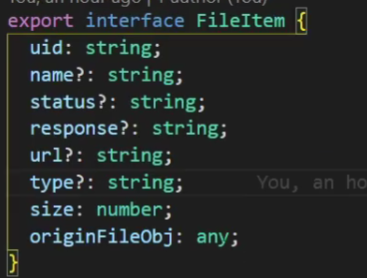
- 这里定义类型时 response 是可能没有的
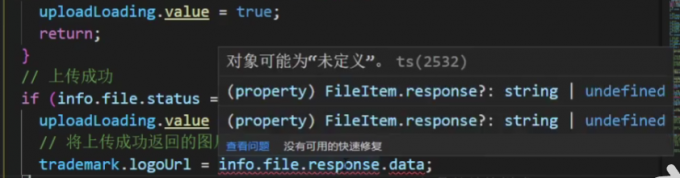
- 所以这里报错了
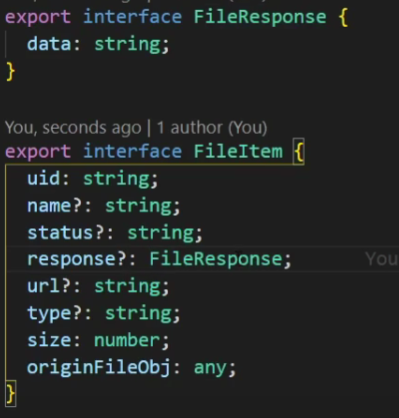
- 将 response 的类型设置为 FileResponse
- 这里就使用断言,就不报错

interface 接口
基本
- 允许加入任何值
- 不确定的值要用 ?
- 可以定义方法
interface Girl {
  name: string;
  age: number;
  bust: number;
  //可选
  waistline?: number;
  //属性的名字是字符串类型,属性的值可以是任何类型
  [propname: string]: any;
  say(): string;
}
继承
interface Girl {
  name: string;
  age: number;
  bust: number;
  waistline?: number;
  [propname: string]: any;
  say(): string;
}
//接口继承接口 这个 Teacher 接口已经有给 Girl 接口中的内容了
interface Teacher extends Girl {
  teach(): string;
}
//类继承接口必须要写上有接口有的所有内容(可选除外)
class XiaoJieJie implements Girl {
  name = "刘英";
  age = 18;
  bust = 90;
  say() {
    return "欢迎光临 ,红浪漫洗浴!!";
  }
}
interface&type
总结:优先 interface,不行再用 type。
相同点
- 都可以描述一个对象或者函数。
- 都允许拓展(extends),效果差不多语法不同。
// interface extends interface
interface Name {
  name: string;
}
interface User extends Name {
  age: number;
}

// type extends type
type Name = {
  name: string;
};
type User = Name & { age: number };

// interface extends type
type Name = {
  name: string;
};
interface User extends Name {
  age: number;
}

// type extends interface
interface Name {
  name: string;
}
type User = Name & {
  age: number;
};
不同点
interface 可以而 type 不行
- interface 能够声明合并
interface User {
  name: string;
  age: number;
}

interface User {
  sex: string;
}

// User 接口为 {
// name: string
// age: number
// sex: string
// }
type 可以而 interface 不行
- type 可以声明基本类型别名,联合类型,元组等类型
// 基本类型别名
type Name = string;

// 联合类型
interface Dog {
  wong: () => void;
}
interface Cat {
  miao: () => void;
}

type Pet = Dog | Cat;

// 具体定义数组每个位置的类型
type PetList = [Dog, Pet];
- type 语句中还可以使用 typeof 获取实例的 类型进行赋值
// 当你想获取一个变量的类型时,使用 typeof
let div = document.createElement("div");
type B = typeof div;
- 其他骚操作
type StringOrNumber = string | number;
type Text = string | { text: string };
type NameLookup = Dictionary<string, Person>;
type Callback<T> = (data: T) => void;
type Pair<T> = [T, T];
type Coordinates = Pair<number>;
type Tree<T> = T | { left: Tree<T>; right: Tree<T> };
enum 枚举
数字枚举
特点:
- 默认不赋值,那么当前的枚举对象里面第一个的值从 0 开始依次递增。
- 枚举对象成员递增只会看当前值的前一个枚举成员的值,枚举对象成员递增值为 1。
- 数字枚举对象会存在反向映射。
只有数字枚举成员才会有反向映射,字符串或其它值是没有的。
enum device {
  phone,
  notebook,
  desktop
}

console.log(device.phone); // 0
console.log(device[1]); // notebook
字符串枚举
enum device {
  phone = "1",
  notebook = "2",
  desktop = "3"
}
console.log(device.phone); // '1'
枚举的属性名也可以是字符串
enum Person {
  "姓名" = "张三",
  "age" = 15
}
console.log(Person["姓名"]); // '张三'
const 枚举
有些情况比如为了节省额外的开销和性能,我们可以选择使用常量枚举,常量枚举使用 const 关键字定义,它与普通枚举不同的时,它会在编译阶段删除该对象,且不能访问该枚举对象,只能访问该枚举对象成员。
常量枚举的成员只能是常量枚举表达式,不可以使用计算值
const enum obj {
  A = 1,
  B = 3 * 6,
  C = 1 & 2
}

console.log(obj); // 报错 编译阶段删除了
const enum obj {
  A = 1,
  B = 3 * 6,
  C = 1 & 2
}

console.log(obj.A); // 1
console.log(obj.B); // 18
console.log(obj.C); // 0
计算的和常量
枚举对象中的枚举成员都带有一个值,这个值是计算的或常量。
只要是表达式那一定就是常量,否则就是计算的。
以下是常量:
enum obj {
  index, // 等价于index = 0
  index1 = index,
  age = 2 << 1,
  num = 30 | 2,
  num1 = 10 + 29
}
以下是计算的:
enum obj {
  nameLen = "前端娱乐圈".length, // 计算的
  num = Math.random() * 100 // 计算的
}
异构枚举
一个枚举对象中可以包括数字枚举成员和字符串枚举成员,但是一般不会这样做。
enum Person {
  name = "前端娱乐圈",
  age = 18
}
枚举对象成员有字符串,不能再设置其它枚举对象成员为计算的值
enum Person {
  name = "前端娱乐圈",
  age = 3 * 6
}
// 会报错  含字符串值成员的枚举中不允许使用计算值
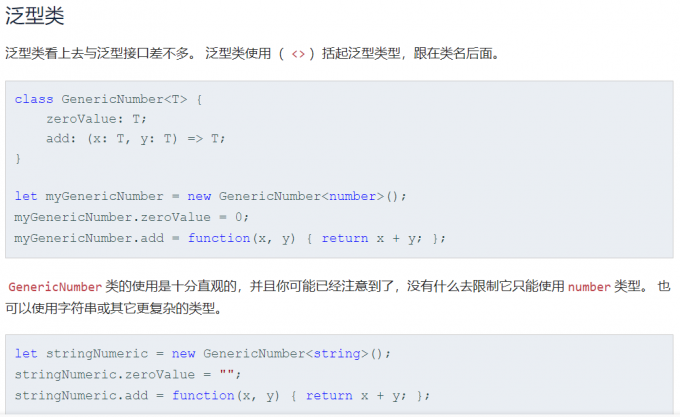
泛型
不确定数据类型,当使用的时候再进行定义
- 在函数中使用泛型

- 使用函数时定义数据类型

//join<T,P> 表示该方法中有两个泛型
function join<T, P>(first: T, second: P): P {
  return `${first}${second}`;
}
//调用方法时确定 T 时 number P 是 string
join<number, string>(1, "2");
class 类
访问类型
- private:只允许再类的内部被调用,外部不允许调用
- protected:允许在类内及继承的子类中使用
- public:允许在类的内部和外部被调用